Price calculator
Work out what a Cloud Backup account costs per month, before you create it.
The price calculator works out what Cloud Backup costs per month for the storage and modules you expect. Use it before you create an account. Everyone can use it, whatever their role.
Open it under Cloud Backup → Price calculator in the menu.
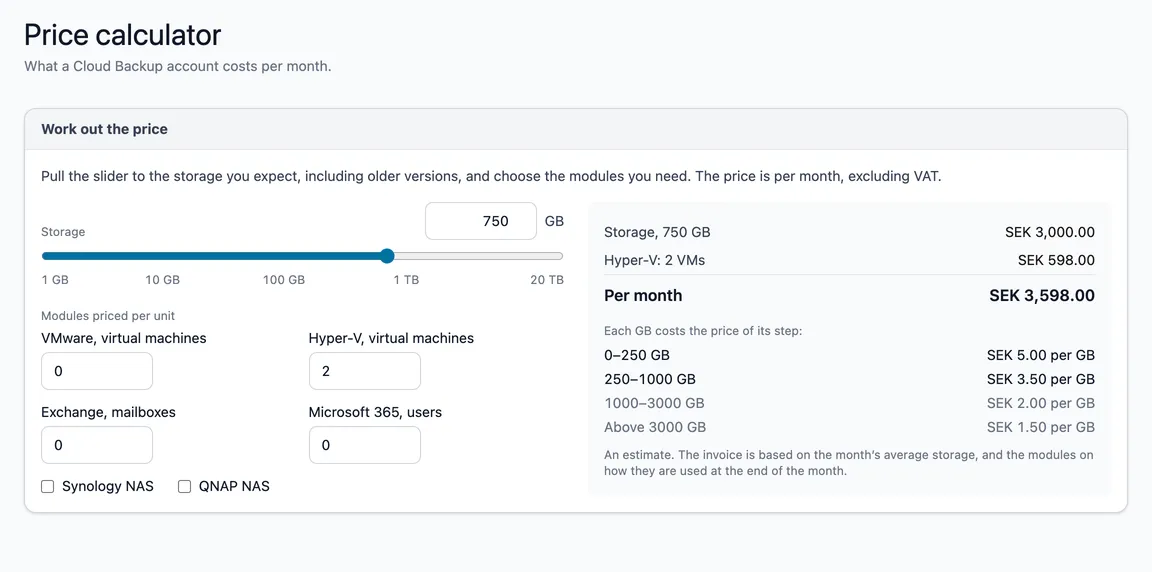
How to work it out
- Storage — pull the slider, or type the number of GB in the box. Count older versions too; they are stored together with the data. The arrow keys move the slider (with Shift in bigger steps).
- Modules priced per unit — enter how many virtual machines, mailboxes or users to back up, and tick NAS if you need it.
The box on the right shows a line per item and what it comes to per month, excluding VAT.
Storage gets cheaper per GB
Storage is priced per GB and month, in steps. Each GB costs the price of its step — the first gigabytes at the first step’s price, the next at the next step’s, and so on. The steps you reach are highlighted in the list under the total.
An estimate
The invoice is based on the month’s average storage, and the modules on how they are used at the end of the month. The calculator works on what you enter.