IT operations
The computers and servers we manage for you — your agreement, what it costs per month and each device.
With IT operations we manage your computers and servers: monitoring, patching and help when something goes wrong. This page shows your agreement, what it costs per month and each device we manage, with whether it is online and when it last checked in.
Open it under IT operations → Devices in the menu. Every role can see the page; there is nothing to change here.
Your agreement
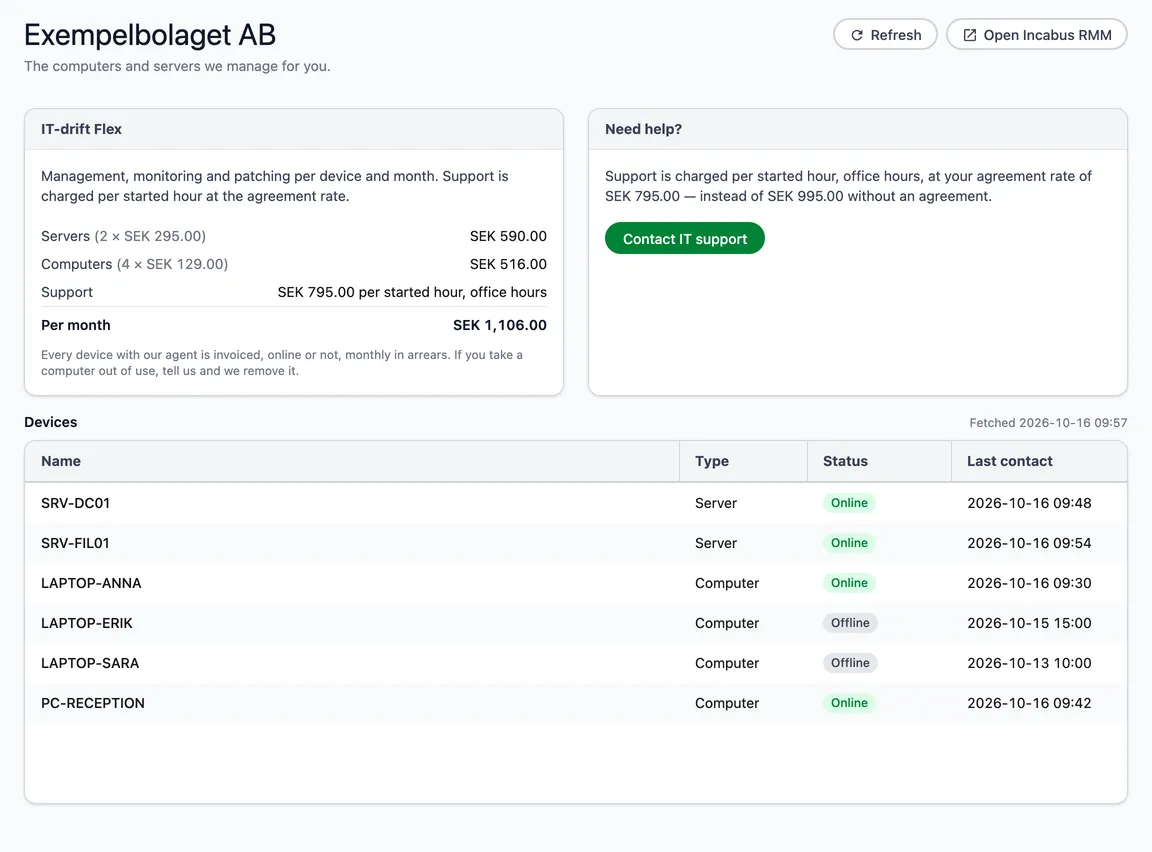
The card at the top has the agreement’s name:
- IT-drift Flex — management, monitoring and patching per device and month. Support is charged per started hour, office hours, at your agreement rate.
- IT-drift Fast pris — the same management, at a fixed price per device and month with support included.
Both give the same management; they differ in how support is paid.
The card shows Servers and Computers as number × price, Support, and what it comes to Per month. Included means the agreement is not invoiced. If a price is missing, a dash is shown.
Every device with our agent is invoiced, online or not, monthly in arrears. If you take a computer out of use, tell us and we remove it.
The Need help? card beside it says what support costs in your agreement, and Contact IT support takes you to the contact page.
The devices
| Column | |
|---|---|
| Name | The device’s name. |
| Type | Server or Computer. Servers come first. |
| Status | Online or Offline right now. A computer that is switched off is not a fault. |
| Last contact | When the device last checked in. |
Beside the heading is when the list was fetched. The information is fetched fresh when you open the page; Refresh in the top right fetches again. If it could not be fetched just then, a yellow box says which time the list is from.
Monitor and manage the devices
Open Incabus RMM in the top right takes you to the panel where the devices are monitored and managed. It is also in the External portals menu in the top bar.
No IT operations yet
If your company has no IT operations, the page says No IT operations yet, and the Get started with IT operations card compares the two agreements side by side, with what a computer and a server cost per month and what support costs. Contact us about IT operations takes you on from there.