Contact us
Send us a message from inside the portal — feedback, a question about Microsoft 365 licences, or a request for IT support.
You can reach us without leaving the portal. Open Contact us from the icon in the header, or from the buttons that lead here: Send feedback on the dashboard, Request IT support on the time reports, Request a quote on the orders, and the help tip in the licence catalogue.
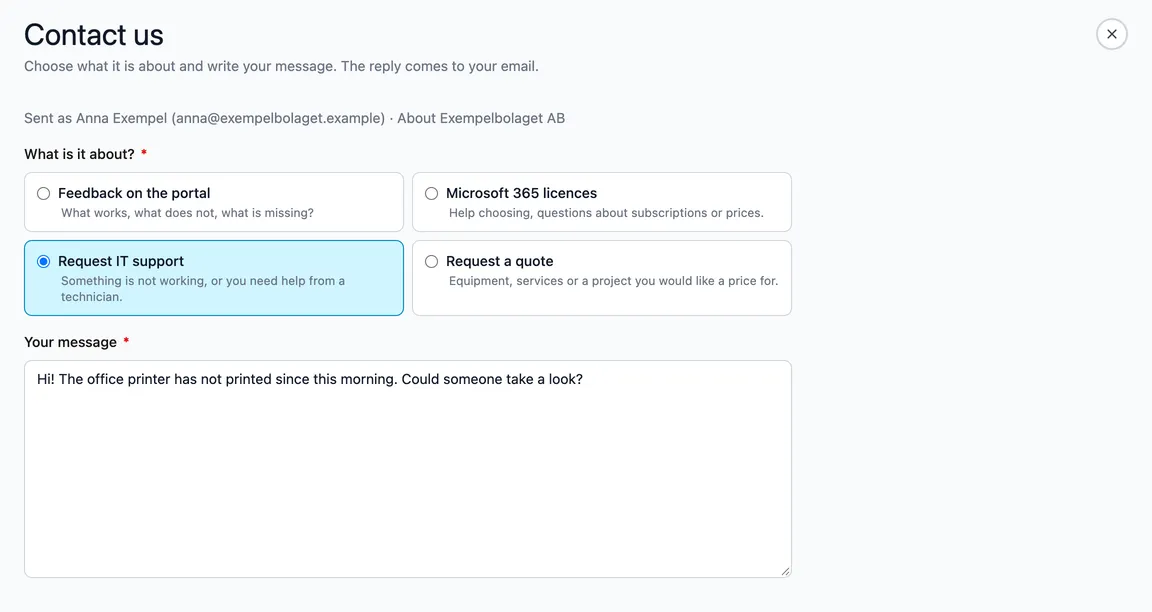
How to send a message
-
Choose what it is about:
- Feedback on the portal — what works, what does not, what is missing.
- Microsoft 365 licences — help choosing, questions about subscriptions or prices.
- Request IT support — something is not working, or you need help from a technician.
- Request a quote — equipment, services or a project you would like a price for.
If you came from one of the buttons above, the right choice is already made.
-
Write your message. The hint in the box suggests what is useful to include.
-
Choose Send. You see Thank you when it has been sent. Choose Send another to write more, or Close to go back to where you were.
The message goes to the right team at Incabus depending on what you chose. It is sent in your name — the page shows Sent as with your name and email, taken from your sign-in — and, if you have chosen a company in the company picker, which company it is about. We also see which page you came from. The reply comes to your email address.
A message can be at most 5,000 characters.
If the page says Messages cannot be sent yet or right now, contact Incabus Support instead — the link is on the page.