Cloud Server
Your company's servers at Incabus — size, location, addresses, backup and what they cost per month.
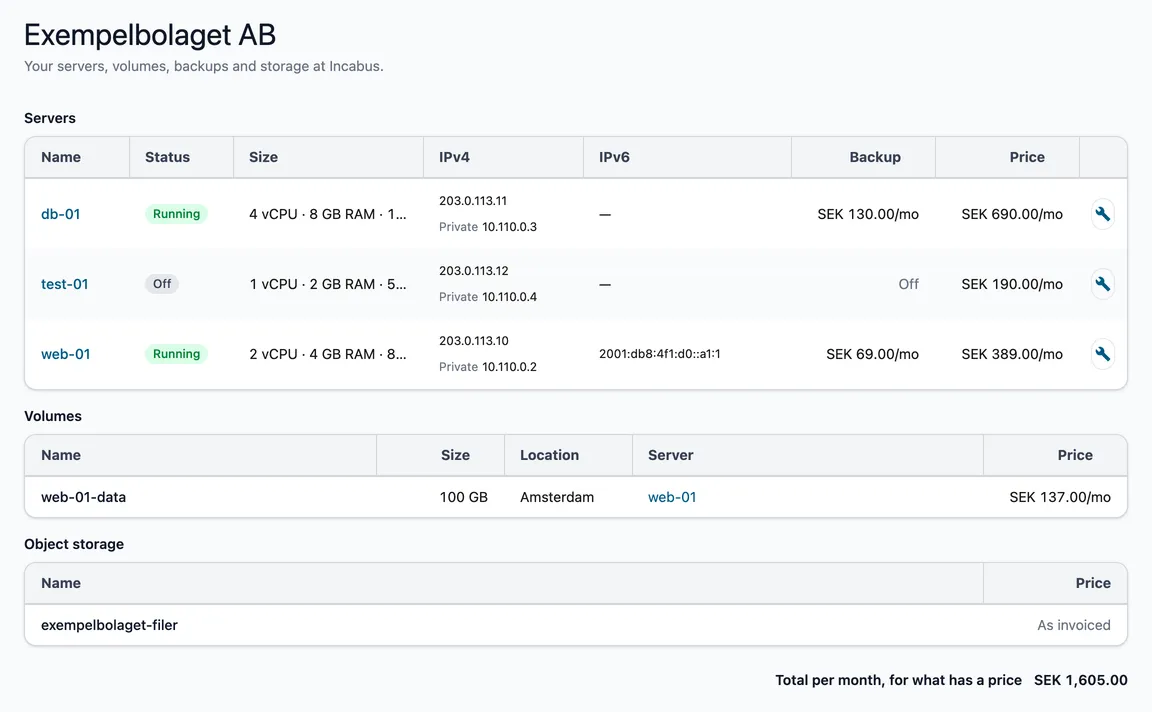
This page shows your company’s Cloud Server: the servers, their volumes and any object storage, with what each part costs per month. From here you open a server to see its backups and snapshots.
Open it under Cloud Server → Servers in the menu. Every role can see the list.
Which company?
The list shows the company selected in the customer picker in the header. If it says No servers linked yet, your company has no servers in the portal yet. The Get started with Cloud Server card under the message shows the way: you tell us what you need, we create an environment with servers and firewalls and link it to the portal. Contact us about servers takes you on from there.
If your company’s servers are split into several projects, each gets its own heading.
Servers
| Column | |
|---|---|
| Name | The server’s name. Click it to open the server. |
| Status | Running, Off, Creating or Archived. |
| Size | Processors (vCPU), memory and disk. |
| Location | The city where the server is. Only shown when your servers are in more than one city — otherwise the city is on the server’s own page. |
| IPv4 | The server’s public address and, below it, the private address in your own network. If the server has more public IPv4 addresses, they are on the server’s page. |
| IPv6 | The public IPv6 address, if IPv6 is switched on. An address that does not fit is shortened — hover over it to see all of it. The small icon by each address copies the whole address. |
| Backup | What the backup costs per month, or Off if it is not switched on. |
| Price | The server’s price per month. |
A server that is off costs the same as one that is running — its place is still reserved.
Volumes and object storage
Volumes are extra disks. The table shows the size, location, which server the volume is attached to, and the price per month. Object storage is storage for files reached over the web. It shows As invoiced instead of a price: the amount is on the invoice.
The two tables only appear when you have any of them.
The prices
- All prices are per month.
- A server is billed for the whole month if it existed at any time during it.
- Prices are recalculated every month, so they can change slightly from month to month.
- Included means the servers are not billed, for example during a trial.
- The total per month is at the bottom. If a price is missing anywhere, the label says the total only covers what has a price.
Good to know
- The list is read directly from our provider every time you open it, so it is always up to date.
- If it says We could not load the servers, the connection to our provider did not go through. Try again in a moment.