Your account
See your account details at a glance and reach the security settings.
This is the first page you see after signing in. It summarises your account and links to everything you can change.
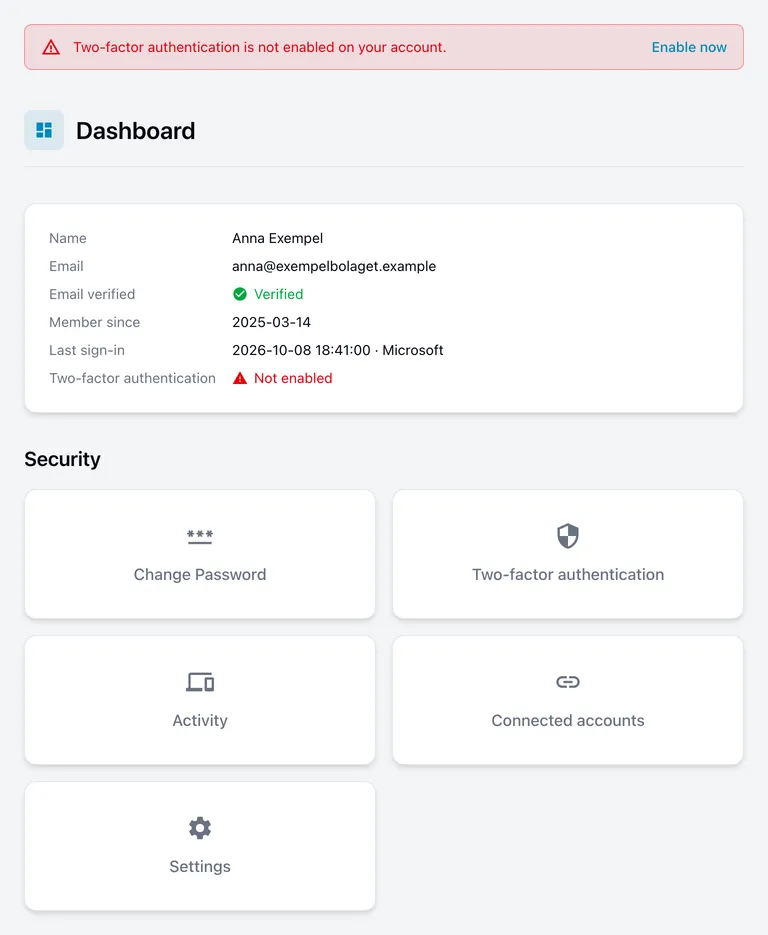
Your details
| Name and Email | What we have on file. These come from your account, or from Microsoft, Google or GitHub if you sign in that way. |
| Email verified | Whether you have confirmed your email address. |
| Member since | When the account was created. |
| Last sign-in | When you previously signed in, and how. Worth a glance — if it says something you do not recognise, see where you are signed in. |
| Two-factor authentication | Whether the extra sign-in step is switched on. |
If a connected account is your only way of signing in, some rows read Verified by your provider or Managed by your provider. That means the setting is handled at Microsoft, Google or GitHub and there is nothing for you to do here.
If you have a password as well as a connected account, those rows show your own settings instead — a connection adds a way to sign in without taking over the password route.
Notices at the top of the page
A coloured message sometimes appears above your details:
- Red — something needs your attention, such as two-factor authentication not being switched on. It stays until you deal with it.
- Green — information only, and you can dismiss it.
If you followed an email verification link that had expired, the message tells you so and offers a fresh one.
Security
The tiles lower down lead to the things you can change:
- Change password
- Two-factor authentication
- Activity — where you are signed in, and recent sign-ins
- Connected accounts — Microsoft, Google and GitHub
You can also reach all of these from the menu behind your avatar, top right, from any page.