Creating an account
Create an Incabus account with an email and password, or with Microsoft, Google or GitHub.
An Incabus account is what you use for every Incabus service. You only need one.
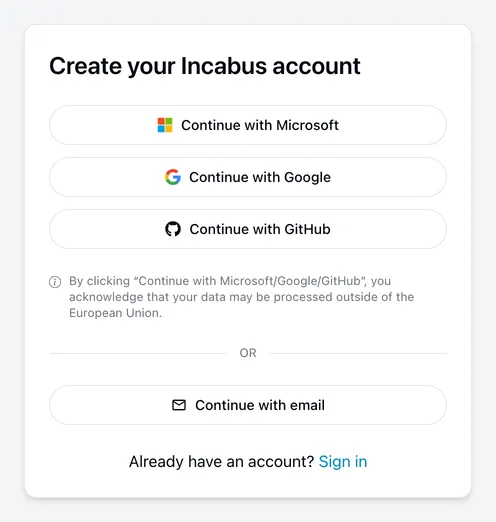
With Microsoft, Google or GitHub
Choose Continue with Microsoft, Continue with Google or Continue with GitHub. The account is created from your details there on first use, and there is no password to choose — those services verify who you are each time.
This is usually the better option if your organisation already uses Microsoft 365 or Google Workspace: one less password, and your organisation’s own security requirements apply automatically.
With an email address and password
- Choose Continue with email.
- Enter your Name and Email, then choose a password and repeat it.
- Tick the box to accept the Terms of Service — the button stays greyed out until you do.
- Choose Create account.
Changed your mind? The back arrow returns you to the other options, and keeps your name and email.
Use your work address if this is for work. It is what colleagues will recognise, and it is what determines which organisation you can be connected to.
The minimum password length is 8 characters, and the bar under the field shows how strong it is as you type. Length matters most.
Verifying your email
We send a confirmation email after you sign up with a password. Following the link confirms the address is yours.
You can use your account before confirming, but the reminder stays on your account page until you do. If the link has expired by the time you follow it, the page says so and offers a fresh one.
If you signed up with Microsoft, Google or GitHub there is nothing to confirm — they have already verified the address.
Already have an account?
Signing up again with the same address will not work. Use sign in, or reset your password if you cannot remember it.
If you have a password and want to add Microsoft, Google or GitHub sign-in, connect them from Connected accounts rather than creating a second account.