Transfer a domain to us
Move a domain from another registrar to Incabus with the transfer code from there.
Here you move a domain you have with another registrar to Incabus. The domain keeps working during the transfer, and it shows in your list of domains straight away.
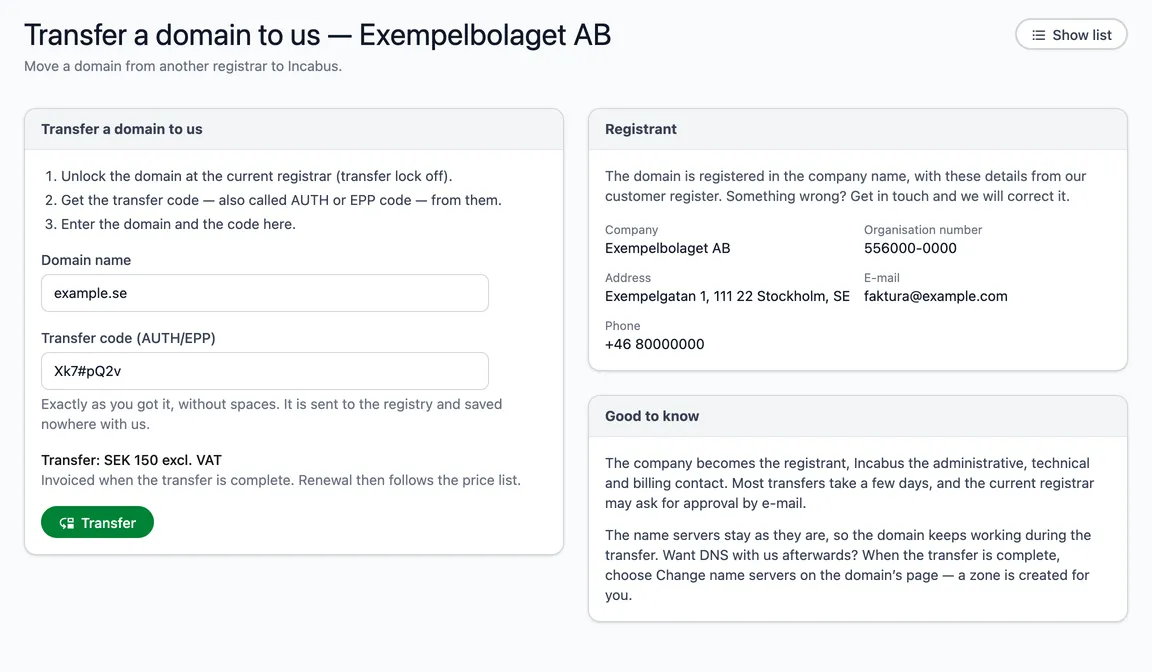
Open the page under Domains → Transfer to us in the menu, or with Transfer to us in the list of domains. Only administrators and owners can transfer domains.
How it works
- Unlock the domain at the current registrar — turn off the transfer lock.
- Get the transfer code from them. It is also called an AUTH or EPP code.
- Enter the domain and the code here, and click Transfer.
The price of the transfer is shown when the top-level domain is recognised. It is invoiced when the transfer is complete, and renewal then follows the pricing. The code is sent to the registry and saved nowhere with us.
Afterwards
Most transfers take a few days. The current registrar may ask for approval by e-mail: approve it, or the transfer stops.
Meanwhile the domain is listed as Transferring, and the domain’s page shows the state and the last day for approval. If the transfer stops — wrong code, the domain locked or refused — it says Transfer stopped, and on the domain’s page you can try again with a new code. See A domain’s settings.
The company becomes the registrant, and Incabus the administrative, technical and billing contact.
The name servers
The name servers stay as they are, so website and e-mail keep working throughout the transfer. Want DNS with us afterwards? When the transfer is complete, choose Change name servers on the domain’s page. See Name servers.
If something goes wrong
- Nobody has registered the domain — then there is nothing to transfer. Register it instead.
- The transfer was refused — the code may be wrong, the domain may be locked at the current registrar, or a transfer may already be under way. Check with them and try again.
- If the registry says no for another reason, our support is notified and will get in touch.