Web Apps
Your websites and WordPress — set them up, follow their state and manage them.
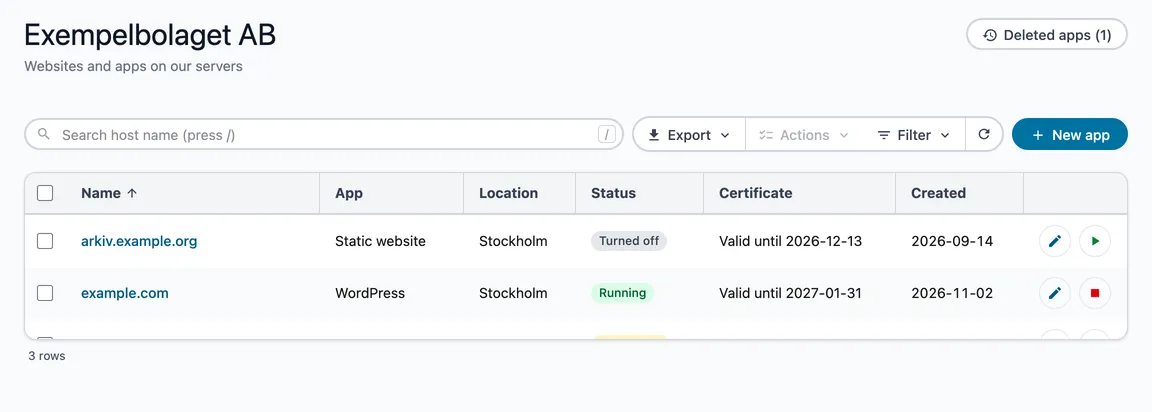
With Web Apps you put up a website or a WordPress site. We look after certificates, security and updates; you look after the content. This page lists your company’s apps.
Open it under Web Apps → Apps in the menu. Every role can see the apps; setting them up, changing and deleting them requires the admin or owner role.
Two kinds of app
- Static website — HTML, CSS and images, served as they are. Fast, and nothing to update. You upload the files in the portal.
- WordPress — WordPress with its own database. Themes, plugins and WordPress itself you update in WordPress.
The list
| Column | |
|---|---|
| Name | The app’s first host name. Click to open the app. |
| App | Static website or WordPress. |
| Location | Where the app runs. |
| Status | See below. |
| Certificate | Valid until a date, Waiting for DNS, Could not be issued or Not yet. |
| Created | When the app was set up. |
Status can be:
- Being set up — the server is working on it. It usually takes a minute.
- Running — the app answers, with a valid certificate.
- Not secure (amber) — the app is running but has no valid certificate yet, so it only answers over http. The certificate comes when the host names point to the app.
- Error — the server could not set up the app. Open the app to see why.
- Turning off and Turned off — the app does not answer, but nothing is removed.
The state changes by itself while the page is open.
On each row the pencil opens the app, and the other button turns the app off (red) or on (green) after a confirmation.
The toolbar
Above the table you search on host name — with å, ä and ö or as they are in DNS — and filter on app and status with Filter. Refresh reads the state again.
- Export — PDF with the list’s columns, or Excel with everything about each app: host names, main address, location, address, status, certificate, disk, access, headers and billing. With nothing ticked you get what the list shows; tick apps to get only those.
- Actions — for the apps you have ticked: Turn off, Turn on or Delete, all at once. Only for admins and owners.
- New app in blue sets up an app, see New app.
Deleted apps at the top shows the apps deleted in the last 30 days, see Deleted apps. The button only shows when there is something there.
No apps yet
When your company has no apps, the page shows what Web Apps is instead: what is included, how it works, and New app for those with the admin or owner role.