Edge
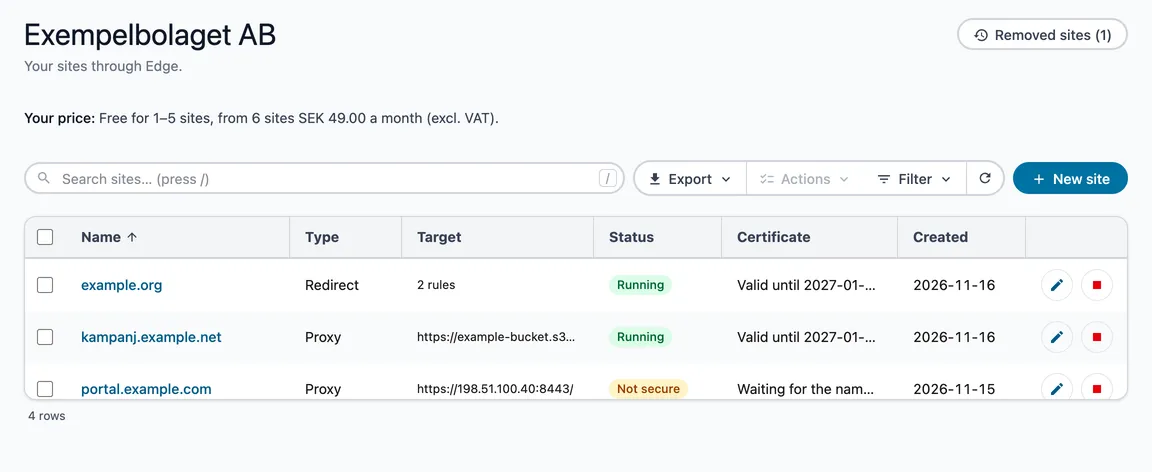
Your sites through Edge — https and access in front of what you run, wherever it is, and redirects.
With Edge your visitors reach your domain through us, with https and access that we take care of, and we pass the traffic on to what runs somewhere else: your own server, a cloud service such as AWS, Azure or Google Cloud, or cloud storage. Edge can also send visitors on to another address. This page lists your company’s sites.
Open it under Edge → Sites in the menu. Every role can see the sites; creating, changing and removing them requires the admin or owner role.
Two kinds of site
- Proxy — the traffic goes through Edge to your server or service. Visitors only see your domain.
- Redirect — the visitor is sent on to another address, with rules per path if you like.
The list
| Column | |
|---|---|
| Name | The site’s first host name. Click to open the site. |
| Type | Proxy or Redirect. |
| Target | The address the traffic goes to, or where visitors are sent — with several rules, their number. |
| Status | See below. |
| Certificate | Valid until a date, Waiting for the names to point here or Could not be issued. |
| Created | When the site was created. |
Status can be:
- Publishing — a change is on its way out. It usually takes under a minute.
- Running — the site answers, with a valid certificate.
- Not secure (yellow) — the site answers but has no valid certificate yet. It is issued when the names point to Edge.
- Error — the site could not be published. Open it to see why; the previous settings apply until the error is fixed.
- Turning off and Turned off — visitors get a page saying the site is turned off. Nothing is removed.
On each row the pen opens the site, and the other button turns the site off (red) or on (green) after a confirmation.
Your price
Above the list is your price: a fixed price per month for the interval your number of sites falls in, and what the next interval costs. The first five sites are free. A site with several host names counts as one.
The toolbar
- Search on name — with å, ä and ö or as written in DNS — and on target. Filter narrows on type and status.
- Export — PDF with the list’s columns, or Excel with everything about each site: host names, main address, target, rules, https, access, headers, status, certificate and where the names should point. With nothing ticked you get what the list shows; tick sites to get only those.
- Actions — for the sites you have ticked: Turn off, Turn on or Remove, all at once, see Remove a site. Only for admins and owners.
- New site in blue, see New site.
Removed sites at the top shows the sites removed in the last 30 days, see Removed sites. The button only shows when there is something there.
No sites yet
If your company has no sites, the page shows what Edge is instead: what is included, how it works, and New site for anyone with the admin or owner role.