Forward
Send the visitors on a name in the zone on to another web address, with a certificate.
With Forward you send the visitors on a name in the zone on to another web address — an old domain to the new one, or campaign.example.com to a page on your website. Others call this web forwarding or Web Forward. We take care of the certificate, so https:// works too.
Open the Forward tab on the zone’s page. Every role sees the zone’s forwards; creating one requires the admin or owner role.
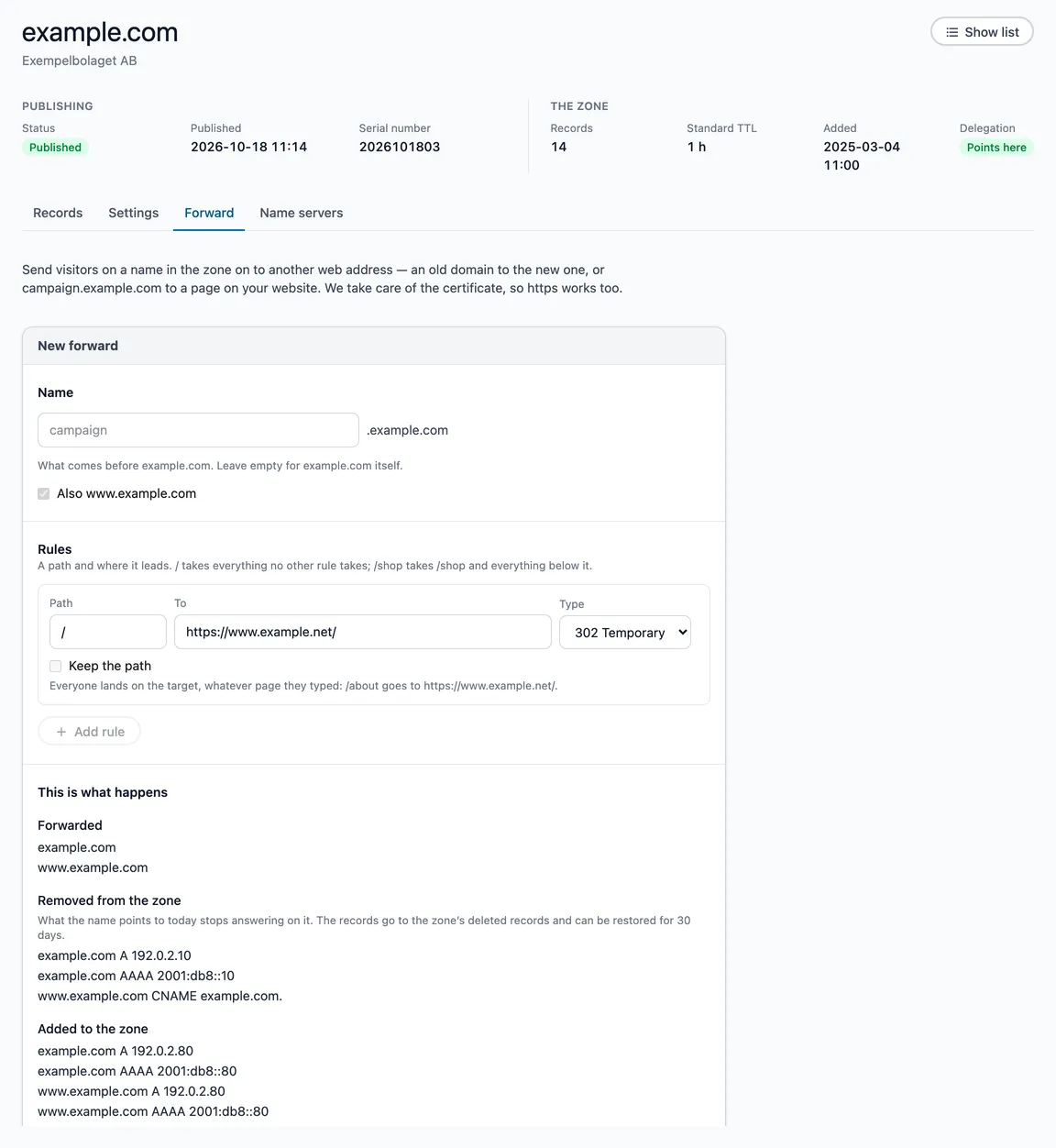
Create a forward
- Name — what comes before the zone’s name, for example campaign. Leave it empty for the zone’s own name. Then Also www… is ticked, so www comes along.
- Rules — where the visitors go. The first rule, with the path /,
takes everything. Add more with Add rule if a certain path should go
somewhere else, for example /shop to your web shop.
- To — the full address, with https://.
- Type — 302 Temporary is the default. Choose 301 Permanent only when you are sure: browsers and search engines remember a permanent forward for a long time, and it is hard to change later.
- Keep the path (below the fields) — campaign.example.com/page then goes to target/page, so visitors land on the same page at the target. Without the tick everyone lands on the target itself. It is the whole path that is kept, the rule’s own part included (/shop/shoes to target/shop/shoes), and the target can then not have a query string (?…). The text below the box shows what happens with your rule.
- Choose Review. The page shows which names are forwarded, which records are removed from the zone and which are added. Nothing has changed yet.
- Choose Forward, or Change to go back.
The forward works once the certificate is ready, usually within a few minutes.
What happens to the zone
The name is taken over by the forward: its A, AAAA and CNAME records are removed, and new A and AAAA records are added. The removed ones go to the zone’s deleted records and can be restored for 30 days. Other records on the name — MX, TXT and others — stay.
The page says no if a forward would cause trouble:
- The name is used by another record — an MX, SRV or NS points at it. Otherwise your e-mail, for example, would have followed.
- Another name points here with a CNAME. Forward it too, or change the record first.
- The name belongs to another of your zones, or is delegated to other name servers.
If the zone has changed since you reviewed, nothing is done — review again.
Change or remove
The zone’s forwards are listed at the top of the tab. The pen takes you to the forward in Edge, where you change the rules, add names or remove it.
Each forward counts as a site in Edge, and costs as one. The first five sites are free, see Edge.