Name servers
Our name servers, and whether the domain points at them — name server by name server.
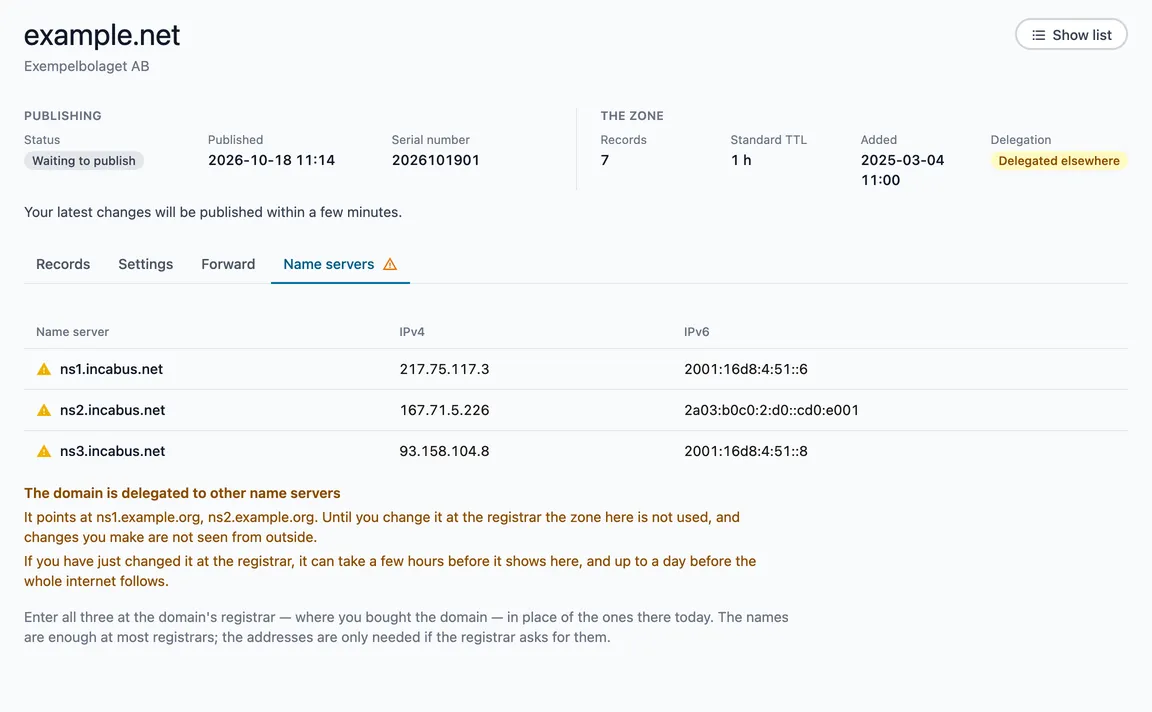
The Name servers tab on the zone’s page shows our three name servers and whether the domain points at them. Every role can see the tab.
Does the domain point at us?
We ask the domain’s top-level domain — for a .se domain the Swedish Internet Foundation — so the answer is what your registrar has set, the same as whois shows.
Each name server is on its own row with its addresses:
- Green check — the top-level domain points at this name server.
- Yellow triangle — it is missing at the top-level domain.
So you also see when only one of them is missing. If we can’t get an answer right now, no marks are shown at all, rather than a wrong one.
If the domain doesn’t point here, the tab has a yellow warning triangle, and below the table it says what is wrong and what to do:
| Answer | Means |
|---|---|
| The domain is delegated to other name servers | The domain points at another provider, which is listed. Changes you make here are not seen from outside. |
| The domain is only partly delegated to us | Some of the name servers are ours, but not all — or ours mixed with others’. Then another server sometimes answers, with other records. |
| The domain is not delegated | The top-level domain doesn’t know the domain. Is it registered? |
Delegation at the top of the zone’s page says the same on every tab: green Points here, or yellow when something needs doing.
Point the domain here
Enter all three at the domain’s registrar, instead of the ones there today: ns1.incabus.net, ns2.incabus.net and ns3.incabus.net. The names are enough at most registrars; the addresses are only needed if the registrar asks for them.
If you have just changed it at the registrar, it can take a few hours before it shows here, and up to a day before the whole internet follows.
Good to know: if a domain points at another provider and is to stay there, remove the zone here — see Remove and restore zones.