Add or change a record
The form for a new or changed record in one of your company's DNS zones, and what each record type means.
This page adds a record to a zone, or changes an existing one. You get here from the zone’s page — New record at the top right, or the pencil on a row. It requires the administrator or owner role.
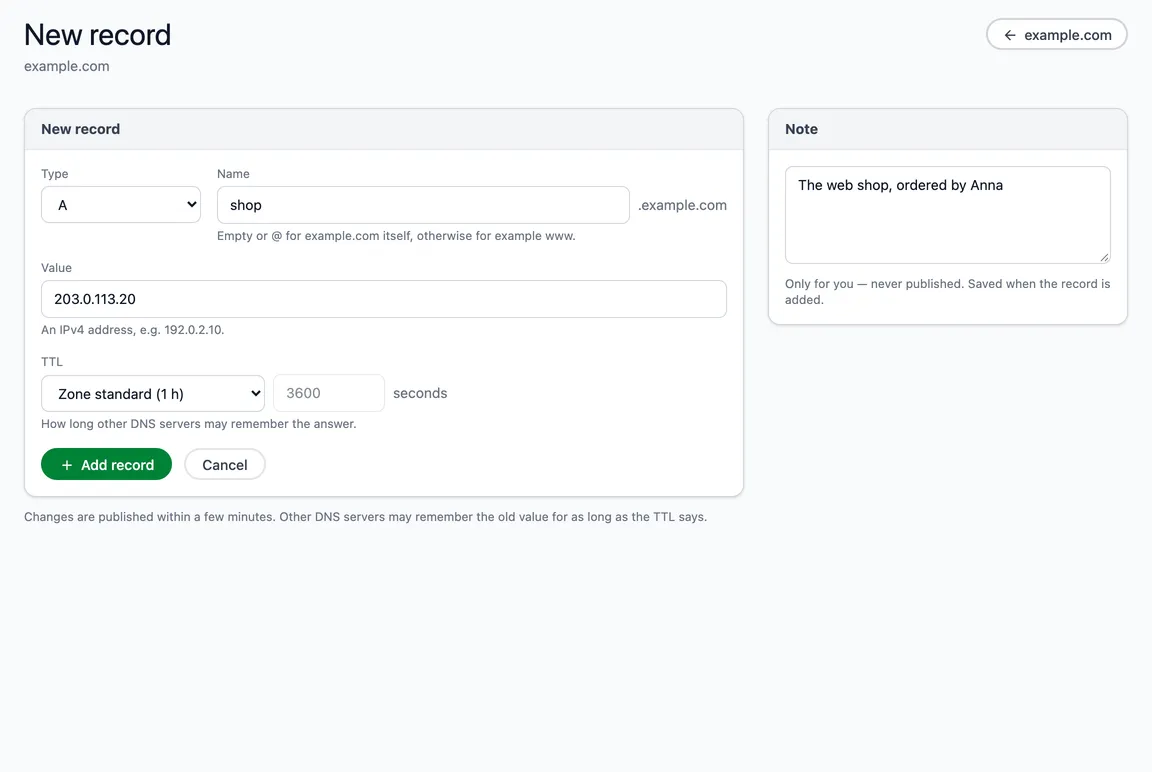
Fill in the record
- Type — what kind of record, see the table below. The hint under Value changes with the type.
- Name — leave it empty, or enter @, for the domain itself. Otherwise enter just the beginning, for example www or _dmarc; the domain is added by itself.
- Value — what the record points at. A name without a dot is in this zone (mail becomes mail.example.se); otherwise enter the full name.
- Priority for MX and SRV — the lowest is tried first. SRV also has Weight and Port.
- TTL — how long other DNS servers may remember the answer. Zone standard usually suits. Choose a shorter one some time before you change a value, and the change takes effect sooner. With Custom… you enter seconds, between 60 and 604800.
Choose Add record or Save. The change is published within a few minutes.
The record types
| Type | Used for | Example value |
|---|---|---|
| A | An IPv4 address | 192.0.2.10 |
| AAAA | An IPv6 address | 2001:db8::10 |
| CNAME | An alias for another name | shop.example.com |
| MX | The server that receives e-mail | mail.example.se, with a priority |
| TXT | Text: SPF, verifications, DKIM and the like | v=spf1 include:spf.protection.outlook.com -all |
| SRV | Where a service is. The name is _service._protocol, e.g. _sip._tcp | sipdir.online.lync.com, with priority, weight and port |
| CAA | Who may issue certificates | 0 issue “letsencrypt.org” |
| NS | Hand a sub-name over to other name servers | ns1.other-provider.com |
| PTR | The name an address points back at — only in reverse zones | server.example.se |
Paste TXT values as you got them; quotes around the text are removed.
What is not possible
The portal tells you before anything is saved:
- A CNAME cannot share its name with any other record, and cannot be on the domain itself — use A and AAAA there.
- NS can only be added on a sub-name. The zone’s own name servers are ours.
- An MX, SRV or NS pointing at a name in the zone requires the name to have an A or AAAA record. Add the address first.
- An address that another record points at cannot be removed until that record is changed.
- A reverse zone (ending in .arpa) takes PTR, NS, CNAME and TXT; an ordinary zone takes everything except PTR.
Note
The Note is only for you and is never published — write what the record is for, or who asked for it. Saving a note on an existing record does not change the zone.
Related
- A zone and its records
- Change several records
- Connections — the records for Microsoft 365, Google Workspace and other services, worked out for you