Name servers
Choose whether the domain uses our DNS or another provider's.
The name servers decide where the domain gets its DNS from: where the website and e-mail are. Here you choose whether the domain uses our name servers or another DNS provider’s, for example Cloudflare.
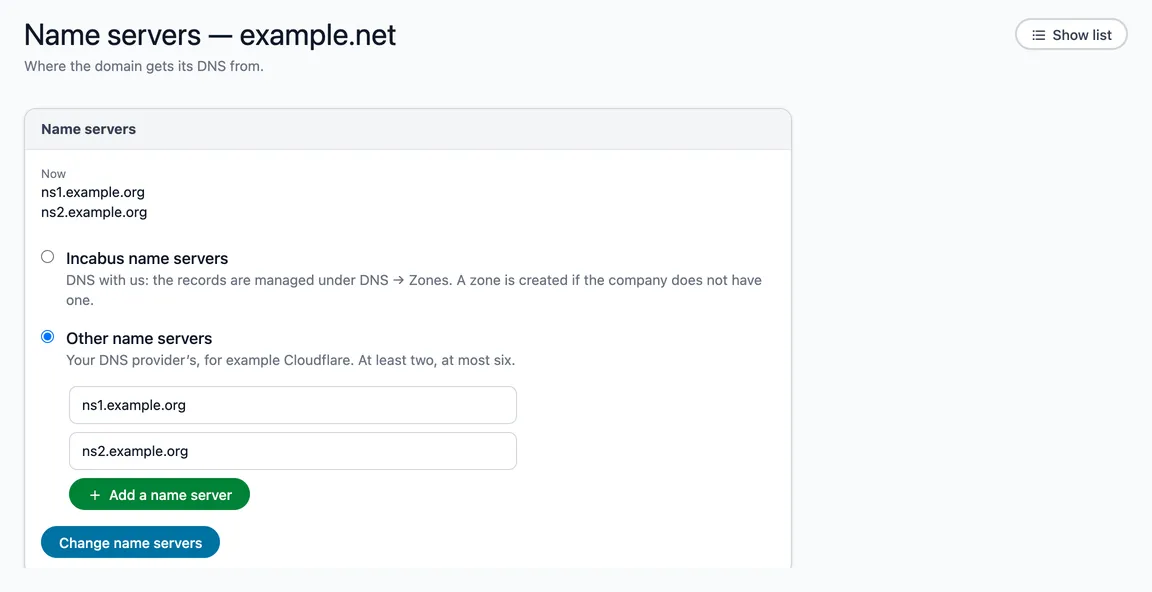
Open the page with Change name servers on the domain’s settings. Only administrators and owners can change name servers.
Choose
At the top are the name servers the domain has now.
- Incabus name servers — DNS with us. The records are managed under DNS → Zones. If the company has no zone for the domain, one is created for you, so the domain never points at us with nothing to answer.
- Other name servers — your DNS provider’s. Enter at least two. Add a name server gives more fields, up to six, and the bin removes one. Name servers under the domain itself (for example ns1.example.com for example.com) cannot be entered here — get in touch and we will help.
Click Change name servers and confirm.
Before you change
Make sure the new name servers have the records first — the website, e-mail and verifications. The domain starts answering from the new ones within a few hours, and anything missing there stops working meanwhile.
- Moving to us: put the records in the zone first, or import them from your current provider.
- Moving away from us: put the same records with the new provider. You can export your zone with us as a zone file.
Choosing the name servers the domain already has changes nothing.